Tag: Security

Vibe Code in a Secured Way

AI coding is powerful. It is also risky if you are not cautious.

The AI does the work. You are responsible for everything.

The bottom-line skill for every engineer nowadays is the judgment to recognize when the AI is performing risky operations.

Know What You’re Exposing

Coding sessions can be stored remotely. LLM requests can be routed through proxies. It’s a good practice to limit what the agent and the LLM model can see.

[…273 words]

Don't Trust the LLM Provider

Anthropic published a finding: several Chinese AI firms secretly routed LLM requests to Claude to get better answers. Those requests included API keys, credentials, rocket code, and military information.

We know “don’t trust user input” and increasingly “don’t trust LLM output.” I would add one more: don’t trust the LLM provider either. Providers can see your prompts as plaintext. Do not put PII or secrets in prompts. If a key is unavoidable, use a short-lived, single-purpose credential.

This changes system design. Do not rely on prompts to define security behavior. Sandboxing and policy enforcement must be hard gates. Limit what an agent can see and do. Preventing jailbreaks and data leaks is not a one-time fix. It is a constant cost of using LLMs.

The Environment Is the Context

The OpenAI / Hugging Face incident involved generations of AI agents working on the same problem. Agents came and went. But the things they left behind — code, infrastructure, research, notes — stayed. Later agents found them and continued the work.

We often think about multi-agent safety as a communication problem. We monitor what agents say to each other, what messages they send, and what information they share. But agents may not need a communication channel to coordinate. They can just change a shared environment.

MIT’s SwarmWorld shows the same thing. Agents can leave artifacts in the world, and other agents can discover and reuse them later. The environment itself becomes a communication medium.

So the context of an AI society may not fit inside any agent’s context window. Part of it lives in the world: files, databases, repositories, services, infrastructure.

That makes multi-agent safety harder.

Give AI Agents Git Access, Not Git Credentials

If you run a coding agent inside a sandbox VM, the usual advice is simple: isolate the filesystem, restrict network access, don’t mount your home directory, don’t expose SSH keys or cloud credentials.

But that leads to one question: without an SSH key, how would the agent run git push safely?

You could give the VM an SSH key or a GitHub token. That basically diminishes the purpose of the VM, and gives the agent more access than it needs. So, don’t do this. AI agents had bad reputation.

Use a proxy

Configure a proxy outside the sandbox.

Inside the VM, git push never talks to github.com directly — it points at the proxy instead. The VM holds no GitHub credential at all. The proxy is what attaches a real token before forwarding the request upstream, so the token stays invisible to the model.
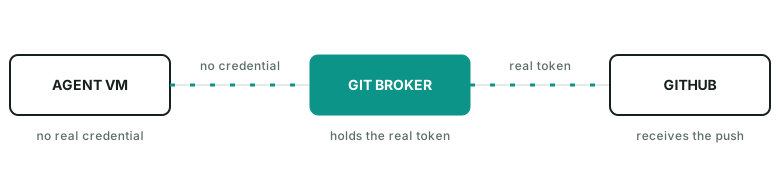
Agent VM sends a git push with no credential to a Git Broker, which attaches the real token before forwarding to GitHub.

The broker can even enforce rules such as:

  • allow fetch
  • allow push agent/run-123
  • deny push main
  • deny force push
  • deny other repos

The agent does not need to hold the real GitHub credential.

A practical guide

In practice, the proxy can be as simple as an nginx docker process listening on 127.0.0.1:8082->80/tcp. It injects gh auth token into outgoing requests as the auth header.

Inside the VM, the push command looks like git push https://github.com/name/repo.git main.

Getting an agent to use it doesn’t take much: just hint it. Something like “push via GitHub broker on host port 8082 instead of origin” works well — the agent figures out the rest on its own.

I published a gist here for quickly launching such a github-broker.

The general pattern

This is a useful way to think about agent permissions in general. A runtime does not need your identity. It needs a small set of capabilities for the current task. For git push, that capability is usually: this repo, this branch, for a short time.

References